The O.A.K. Method
Organize your files, Assemble your stack, Keep your data
1
Organize
Organize your files, by shaping your digital office, be intentional with your design, find what works, and get what you need.
2
Assemble
Assemble your stack, into your preferred collection of hardware and software tools that will enable you to most effectively work with your information.
3
Keep
Keep your data, it’s literally the everything; lose it, and you’re left with empty gadgets, like blank pages in a cherished journal. Back it up, or risk regret.
Modern technology is overwhelmingly complicated. It’s a torrent: new computers, devices, apps, security protocols, workflows—you name it. Most of what you learned a decade ago? Obsolete.
Enter the O.A.K. Method—a simple design framework for information technology (IT). It invites you to step off the endless upgrade treadmill and outdated holdouts. Instead, embrace three fundamental, timeless patterns to navigate this shifting landscape with confidence.
I’ve spent over 15 years troubleshooting tech for individuals, businesses, friends, and family in every scenario imaginable. I thrive on the latest gadgets, but I constantly see others drowning in frustration, craving solid ground to build their own tech savvy.
The O.A.K. Method provides that ground: Organize, Assemble, and Keep. These patterns, drawn from how humans have handled information for millennia, cut through the noise. Bold claim? Absolutely. But if you’re ready to reclaim control, let’s dive in.
Why Focus on Information Technology?
At its core, tech is about information. IT is our everyday toolkit for capturing, sharing, and shaping it—think emails, docs, photos, and databases. Information isn’t new; it’s as old as humanity itself. We’ve just upgraded from cave walls and scrolls to screens and clouds.
Yet unlike a trusty pen and paper, digital tools morph constantly: fresh interfaces, endless updates, shiny new buttons. The chaos distracts us. But strip away the gloss, and it’s still about interacting with information. Master the fundamentals of how you want to work with it, and you’ll wield any tool flexibly—without chasing every update.
That’s where O.A.K. shines. These three patterns—Organize, Assemble, Keep—equip you to manage information effectively, now and for generations. They’re simple at first glance but reveal deep insights for a calmer digital life.
Organize Your Files: Because Digital Chaos Kills Productivity
Why Organize? Digital storage doesn’t mean self-organizing—at least not yet. In fact, true self-organization might only compound the chaos. The bottom line: Our files naturally accrue structure, but it’s up to you to shape it intentionally, rather than letting entropy take over. Whether you’re wrangling work documents, family photos, or project notes, if you can’t find it, you can’t use it. User-friendly file systems lure us into endless nesting of folders, burying our data in stagnation and rendering it useless.
Picture your computer’s folders like home plumbing: Add sinks willy-nilly, and soon you’ve got leaks, clogs, and a flooded mess. Haphazard setups waste time and spark frustration. With multiple devices and apps spitting out files, the minimal fix? A standardized system that evolves with you.
One proven approach: PARA (Projects, Areas, Resources, Archives), from productivity expert Tiago Forte’s Building a Second Brain. It’s dead simple—sort files into active projects, ongoing responsibilities, reference materials, and long-term storage. Check out Forte Labs for the full guide; it’s a game-changer for anyone wrestling with digital clutter.
No “perfect” system exists, but aim for one that’s:
- Simple: Minimal parts to stay viable, avoiding elaborate schemes that crumble under their own weight.
- Flexible: Works across situations, not rigid or niche.
- Easy: Quick to learn and apply—no massive upfront grind.
Pro Tip: Nail your naming. Ditch “Project.docx” for thoughtful labels like “2025-10-ClientX-Project-Draft” or “Category-Subtopic-Version.” It dramatically boosts searchability and saves sanity over time.
Ready to declutter? Pick one folder today, apply PARA, and watch the relief unfold.
Assemble Your Stack: Build Tools That Last (Mostly)
With files tamed, turn to the gear that makes it all hum: your stack—a curated kit of hardware and software for wrangling digital info (see Figure 1). Assembling it smartly means understanding these tools in context, not as isolated gadgets.
Hardware and software are enhancers: They amplify tasks but live in a fluid ecosystem. They’re temporary—apps sunset, devices age—while your info endures. Thriving tools need active communities; neglected ones rust into obsolescence.
The trap? Fixating on the latest iPhone or AI app (the trees) while missing the integrated system (the forest). Step back: View your stack modularly, by types rather than brands. What hardware categories (laptop, external drive) and software types (word processor, cloud sync) align with your goals?
Priorities First: Resources are finite—time, money, attention. Chasing “everything” yields mediocrity. Budget like you would finances: Rank outcomes (e.g., seamless collaboration > bleeding-edge graphics), then allocate.
Here’s your 30,000-Foot Roadmap:
- Know your desired outcomes: What do you need tech for—work, creativity, connection?
- Prioritize them: Most to least important (zero-sum reality).
- Explore types: Scout hardware/software categories that fit.
- Assemble: Mix and match for your stack.
- Rinse and repeat: Review every 5 years as tech shifts.
This abstract lens brings clarity, dodging decision paralysis. Your stack becomes a purposeful system, not a gadget graveyard.
O.A.K. Method Hardware Stack Assembled
Here’s an example of a simple 4 person office using The O.A.K. Method.
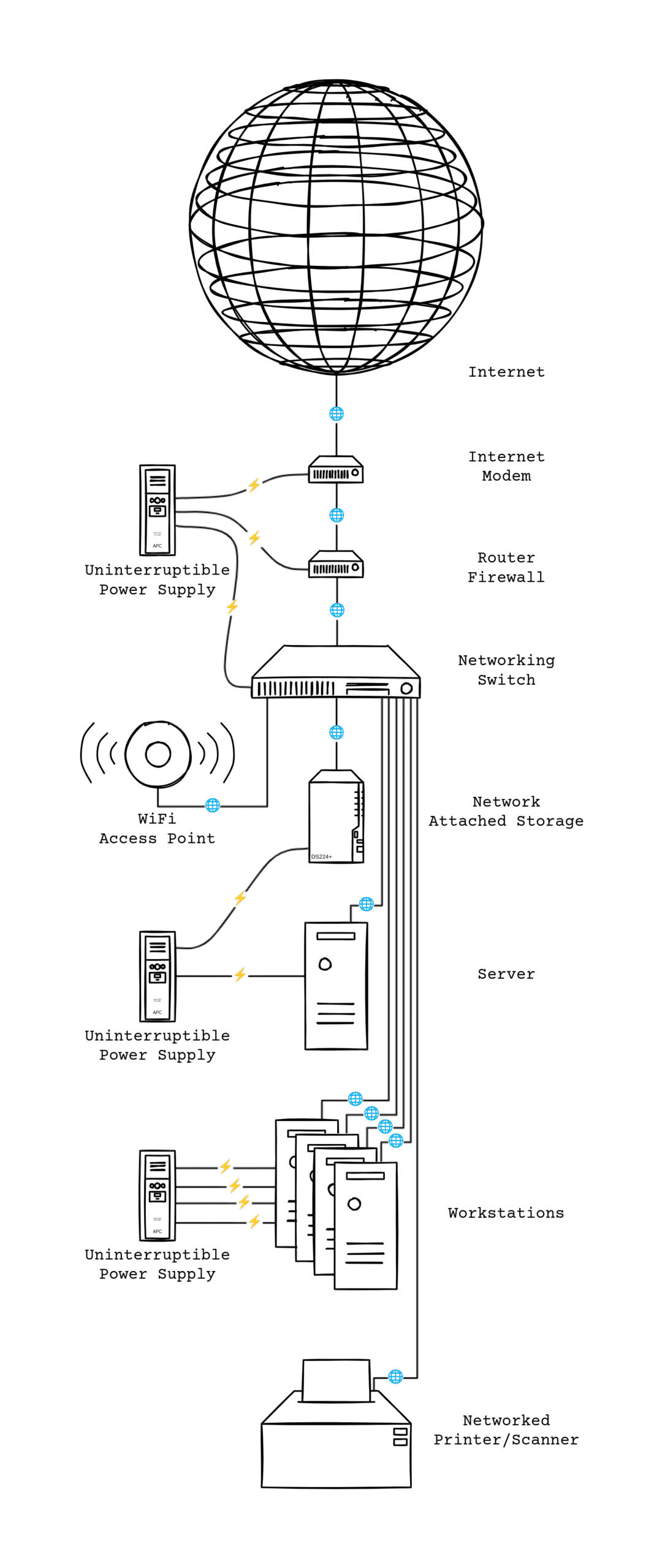
Figure 1: The O.A.K. Method Hardware Stack Of Small 4 Person Office Environment. Shows power and data flows for connected hardware components. Hardware components: DOCSIS 3.1 Cable Modem, Router/Firewall or UTM Appliance, Network Switch, NAS with RAID1 (Mirrored Drives), WiFi-6 or newer Access Point, UPS (Uninterruptible Power Supply) 900W+ with Voltage Regulation, Dell Server, Dell Workstation, Networked Laser Printer.
Keep Your Data: The Ultimate Safeguard
O.A.K.’s crown jewel? Keep. You’ve poured time and treasure into your data—custom notes, irreplaceable memories, business gold. Lose it, and you’re left with empty hardware, like a journal stripped of its pages.
Today’s tech patchwork—apps from rival companies, spotty standards—breeds failure. It’s a jigsaw with mismatched pieces. Protect against it with a rock-solid backup system. For most, simplicity wins over complexity.
Core Components:
- Backup Agent: Software handling the schedule and process (e.g., Time Machine or Backblaze).
- Backup Source: Your data’s origin—full drive or key folders.
- Backup Destination: Storage spot using snapshots (efficient versioning without bloating space).
- Backup Settings: Rules for frequency, retention, and encryption.
Follow the 3-2-1 Rule: 3 copies, 2 media types, 1 off-site.
Hardware’s 5-year churn (drives degrade) demands a lifecycle:
- Years 1-5: Active backups on your machine + external HDD/NAS + cloud/off-site.
- Every 5 Years: Migrate to fresh enterprise-grade drives (reliable, off-the-shelf winners over niche tapes).
- Long-Term: Copy to two offline HDDs in sealed, static-shielded bags. Store at 55°–85°F in a fire-safe.
Favor non-proprietary formats (e.g., export docs to PDF) to dodge lock-in. Your data? Priceless. Treat it that way.
Wrapping Up: O.A.K. Your Way to Tech Freedom
Organize for findability, Assemble for efficiency, Keep for longevity—these patterns aren’t fads; they’re human constants in a pixelated world. Implement one this week, and feel the shift from overwhelm to ownership.
©Copyright 2025 PC SOLUTIONS / DATABOXES
All Rights Reserved
DON’T PANIC!